
Viral videos,without the work.

Pick a template and layZ makes the whole Short: script, voiceover, edit and captions. Ready to post.

The Impossible Pool

Generic Commentary template

  1. Video Downloader
  2. AI Script Writer
  3. AI Voiceover Generator
  4. AI Video Editor
  5. Video Exporter

Running step 1 of 5

Make videos from the AI apps you already use

ChatGPTClaudeCursorVS CodeCopilotGeminiWindsurf / DevinOpenCodeZed

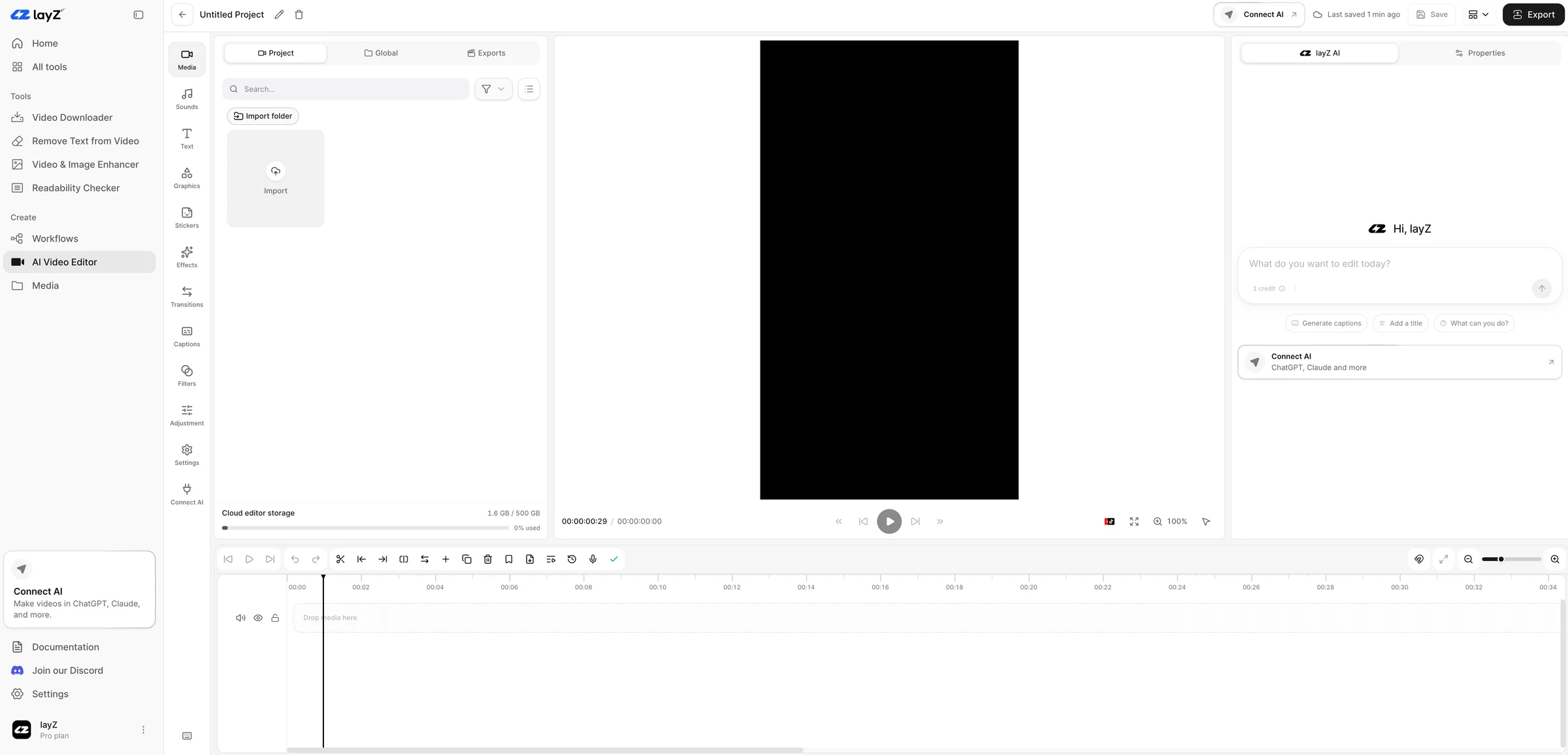
One editor for every Short you make

Every project lands in the layZ editor, whether you started it in the dashboard or your AI built it for you.

The layZ AI video editor: media panel, preview canvas, layZ AI chat and timeline
  • Ask layZ AI

    Type what you want changed. Captions, titles, cuts and effects land on the timeline.

  • Made for vertical video

    Sounds, stickers, transitions, filters and caption styles sized for 9:16.

  • Pick up where your AI left off

    Projects started over MCP open here with every layer still editable.

Make videos straight from your AI chat

Connect layZ to Claude, ChatGPT, Cursor and other MCP apps. Ask for a Short and your assistant runs the layZ tools and templates for you.

Claude
ChatGPT
Cursor
Gemini
layZ
layZ MCP
Download
Remove watermark
Enhance quality
Write script
Voiceover
3D animation
Edit
Export

Plus captions, sound effects, stickers, fonts, web research and every template step.

Make a commentary Short from this clip

Claude is using layZ

  1. layz_start_workflow
  2. layz_download_media
  3. layz_get_script_brief
  4. layz_approve_script
  5. layz_begin_edit_session
  6. layz_review_edit_session

Building your video

Generic Commentary template preview

layZ in numbers

AI apps with a layZ setup guide
9
Platforms the downloader supports
16+
Upscaling in the video enhancer
4x
3D Animation render frame rate
60 fps

From prompt to posted

Setup happens once. After that, making a Short is just a message to your AI.

Connect your AI once

Add layZ as a connector in Claude, ChatGPT, Cursor or any MCP app and sign in. No token to copy.

Add custom connector

Name

layZ

Remote MCP server URL

https://api.layz.ai/mcp

CancelAdd

Templates that know the format

Each template is a full workflow from source to export, tuned on real Shorts. New templates ship as we build them.

Generic Commentary

Turn downloaded footage into a grounded story. The AI inspects the frames, writes the script and narrates it, then adds expressive captions and graphics you can still edit.

Steps

  1. Video Downloader
  2. AI Script Writer
  3. AI Voiceover Generator
  4. AI Video Editor
  5. Video Exporter

Good to know

  • About 6 minutes per Short
  • Start it from the dashboard or your AI
  • Source audio muted so the narration stays clean

3D Animation

Turn any subject into a seamless 3D build-up Short. Your AI writes a problem-by-problem script, designs and renders the animated scene, then layZ adds voice and captions.

Steps

  1. AI Script Writer
  2. AI Voiceover Generator
  3. 3D Scene Generator
  4. AI Video Editor
  5. Video Exporter

Good to know

  • About 25 minutes per Short
  • Started from Claude, ChatGPT, Cursor and other MCP apps
  • Renders at 60 fps, synced to the narration

Every tool, ready on its own

Use any tool straight from the dashboard, or let a template chain them together.

Text & watermark remover

Strip captions, logos and watermarks. The frame is rebuilt underneath, no blur.

youtube.com/watch?v=jNQXAC9IVRwDownload

Video downloader

YouTube, TikTok, Instagram and 16+ more platforms. Get the original file.

Readability checker

Eight formulas, one grade, and the lines to fix before you record.

BeforeAfter

Video & image enhancer

Upscale up to 4x, denoise, sharpen and restore faces. Drag to compare.

AI voiceover generator

Premium voices with studio-grade controls.

AI script writer

Short-form scripts from your clip or your notes.

AI video analyzer

Scenes, objects, metadata and the transcript.

AI video clipper

Cut one long video into several Shorts.

3D scene generator

Your AI designs an animated 3D scene and layZ renders it at 60 fps. Frames from a real render.

Pricing

Plans differ in credits, storage and speed. Every plan includes:

  • Every tool and the AI video editor
  • Unlimited layZ MCP: make full videos from your AI chat
  • Commercial use
Billing period

Compare every limit

  1. Starter

    Content creation made easy

    $20/ month$240 billed yearly

    • 1,000 credits every month
    • 25 GB cloud editor storage
    • Workflow files kept 7 days
    • 1 job running at once
    • Discord and email support
    Get Starter
  2. Creator (most popular)

    Built for posting every day

    $40/ month$480 billed yearly

    • 2,500 credits every month
    • 100 GB cloud editor storage
    • Workflow files kept 30 days
    • 3 jobs running at once
    • Priority Discord tickets and email
    • Unlimited custom video template requests
    • 10% off every credit top-up
    Get Creator
  3. Pro

    Run your content like a studio

    $89/ month$1,068 billed yearly

    • 6,000 credits every month
    • 500 GB cloud editor storage
    • Workflow files kept 90 days
    • 6 jobs at once, first in the queue
    • Unlimited custom video template requests
    • Dedicated account manager
    • Direct line to our development team
    • 20% off every credit top-up
    Get Pro

Questions, answered

Setup guides for every AI app live in the docs. Anything else, contact the team.

  • layZ is a toolkit for short-form video. Download clips, remove text and watermarks, enhance footage, check scripts, and build full Shorts with templates and the AI video editor.

  • It connects layZ to the AI app you already use, like Claude, ChatGPT, Cursor, VS Code, Gemini CLI or Zed. You describe the video in chat and your assistant runs the layZ tools and templates for you. The finished project opens in the layZ editor so you can tweak and export it.

  • Sign in, open Connections and pick your AI app. Most apps connect by signing in to layZ in the browser, with no token to copy. Every plan includes unlimited MCP use.

  • Creators and teams posting YouTube Shorts, Reels and TikToks who want to publish more without living in a timeline.

  • No. Every tool works from the dashboard: upload, pick a tool, download the result. The MCP is optional and only needs a one-time sign-in.

  • Yes. Your files are processed to deliver the job you asked for. We do not turn your uploads into public content.

  • Every plan includes every tool, the AI video editor and unlimited layZ MCP. Starter is $29/month with 1,000 credits and 25 GB of editor storage. Creator is $59/month with 2,500 credits, 100 GB, priority support and unlimited custom template requests. Pro is $129/month with 6,000 credits, 500 GB, a priority job queue and a dedicated account manager. Yearly billing is $20, $40, or $89 a month. Subscribers can buy credit top-ups anytime, and Creator and Pro pay 10% and 20% less for them.

Your next Short is one prompt away

Every plan includes every tool, the editor and unlimited MCP. Connect your AI once, then just ask.